
TradingView
- Charting
- Since 2011
- New York, United States
How the score is made
What it costs
- Plan
- Essential
- Purpose
- Charting
- Billing
- Annual commitment (monthly equivalent)
- Runs on
- Web, Desktop, Mobile
- Trial
- Trial length varies
- Trading accounts
- Not verified
Key facts
- Access
- Desktop + Web + Mobile
- Charts per tab
- 2 charts
- Indicators per chart
- 5 indicators
- Price alerts
- 20 alerts
Compare with


The full review
In brief
TradingView is the web's best charting platform: multi-asset, browser-native, Pine Script-driven, and free to start, with broker-connected order entry and a DOM where the broker supplies supported depth data.
TradingView is a browser-native charting platform and trading social network run by TradingView, Inc., a US-registered company founded in 2011 with development roots in the UK and Eastern Europe. It describes itself, in its own words, as "a charting platform and social network used by 100M+ traders and investors worldwide," and that is the honest shape of it: a charting-first tool that also connects to brokers for order entry, wrapped around one of the largest trading communities on the internet. It is not a native futures execution platform in the mold of NinjaTrader or Sierra Chart; it is the analysis layer that most of the market now charts on, with a trade panel bolted to the side.
If you want the best charts on the web and you trade across more than one asset class, TradingView is close to unbeatable, and you can start for free. The catch for an active futures trader is execution: orders are routed through a connected broker rather than fired into a native DOM, which adds a small but real latency and leaves you without a true Level 2 ladder. Use it as your charting and analysis brain, and, if you are a funded futures trader, as a front-end at one of the growing number of prop firms that support it, while keeping your expectations for scalping-grade order flow modest.
Markets
TradingView is genuinely multi-asset. It charts and, through connected brokers, trades stocks, futures, forex, crypto, options, ETFs and bonds. Platform access is as broad as it gets in this collection: it runs in any web browser with no install, and there are native desktop apps (Windows, macOS, Linux) and full-featured iOS and Android apps. That cross-platform reach is a real differentiator; a Mac futures trader who is locked out of Windows-only desktop platforms can run TradingView natively.
For a DOM-focused workflow, check the exact broker connection, available depth and order controls. TradingView documents a DOM, but that does not establish parity with every dedicated futures platform. Evaluate the features you need rather than treating a charting-first design as evidence that ladder trading is absent.
Charting
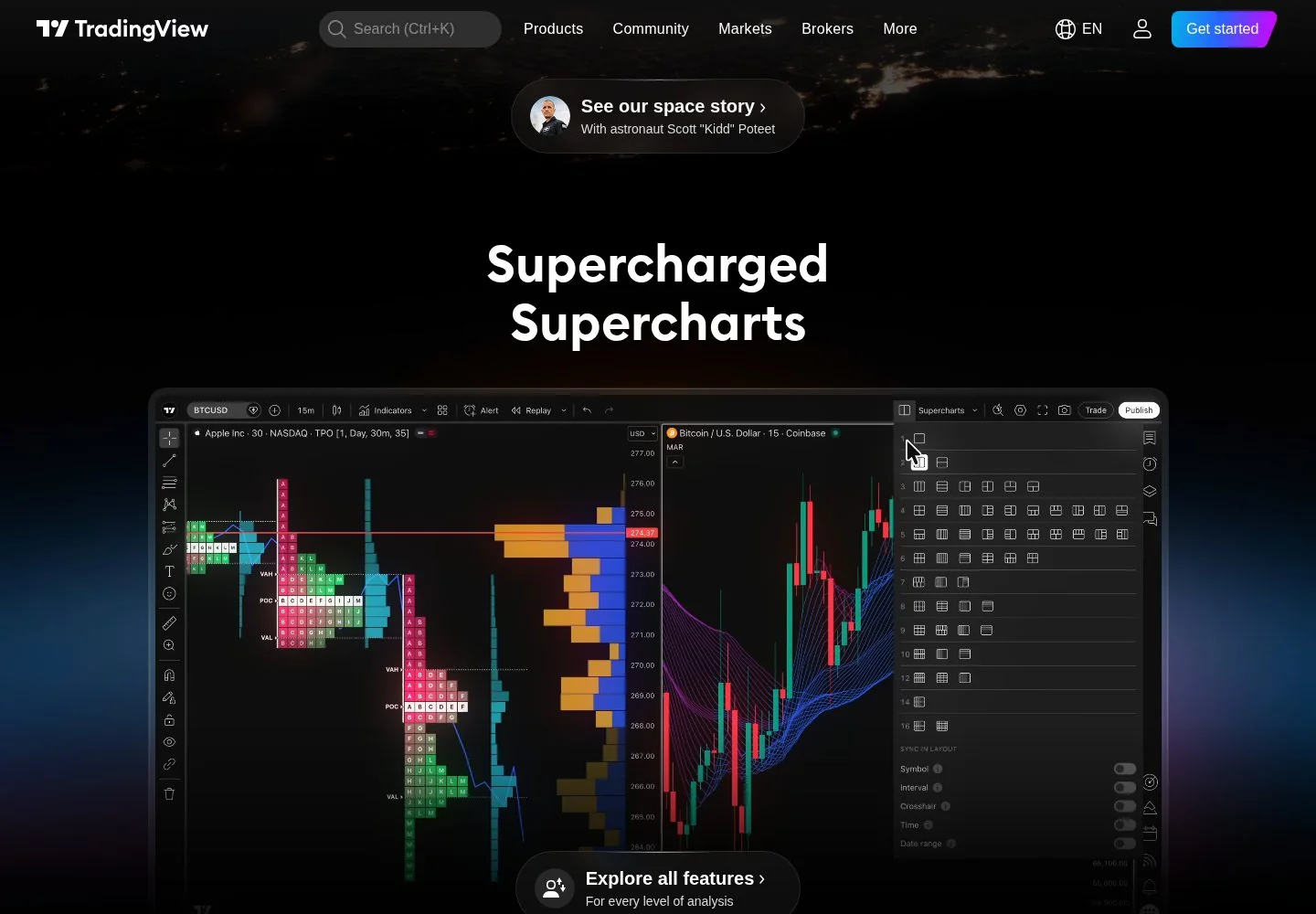
Charting is where TradingView is simply the benchmark. You get the full range of timeframes down to second-based and tick-based intervals on the higher tiers, hundreds of built-in indicators, a deep drawing-tool set, and multi-chart layouts (up to 16 charts per tab on the Ultimate plan). Serious analysis features that other platforms charge extra for are here: Volume Profile, Time Price Opportunity, volume footprint and volume candles, Renko, Kagi, Point and Figure, Bar Replay for manual backtesting, indicators-on-indicators, and charts built on custom formulas. Rendering is fast and clean in the browser, which is the quiet miracle of the product. The one honest limitation is that everything is chart-centric: this is an analyst's canvas, not a trade-execution cockpit.
Execution
TradingView supports broker-connected order entry and a depth-of-market panel. Its documentation requires a connected broker supplying supported depth data and describes market, limit and stop entry from the ladder. The depth comes from the broker and can differ from the chart data. Confirm the symbol, permissions and order types on the actual connection.
Individual reports of fast or delayed execution do not establish a controlled latency comparison. The route includes the platform, network and broker, and behavior can vary with order type and market conditions. This review contains no measured fill-speed benchmark or live-account execution test.
Automation
Automation runs on Pine Script, TradingView's own scripting language, and it is a genuine strength. Pine is approachable, well documented, and backed by a massive public library of indicators and strategies, plus a Pine Screener to scan the market with your own scripts. The Strategy Tester lets you backtest a coded strategy directly on the chart.
The Pine strategy documentation distinguishes default bar-close calculation from configurable recalculation and order processing. Bar Magnifier can use lower-timeframe data, and commission and slippage assumptions can be modeled. Those settings improve what a test represents; they do not recreate live liquidity, queue position or guaranteed fills. Record the settings alongside any result.
Data and feeds
Data entitlement depends on the symbol, exchange, subscriber status and broker connection. Some quotes are delayed or use an alternative source. TradingView explains when existing broker data subscriptions can be verified for access; this is conditional and does not mean every simulated prop account supplies every TradingView chart feed. Check both chart and order-panel data.
Plans and cost
Compare the current plan table for billing periods, chart and alert limits, and cancellation terms. A historical discount or feature count is not a current entitlement.
Exchange data and broker trading charges can be additional to charting subscriptions. Check the exchange's subscriber classification and the plans available to that classification; frequent trading alone does not establish professional data status.
A paid plan can be worthwhile if its additional charts, alerts or data history are useful to your workflow. A missed setup is not automatically a missed profit, so it cannot establish that a subscription pays for itself. Compare the additional subscription and data costs with measured benefits, and verify any broker-provided data entitlement before assuming that a separate exchange charge disappears.
Prop firms
Prop-firm compatibility depends on the specific programme, account generation and connection. A firm offering one supported TradingView route does not establish that every account or platform option supports it. Verify the current connection instructions, platform surcharge and data entitlement with the provider before buying; our prop-firm reviews reviews identify the evidence and remaining limits.
Mobile
Web, desktop and mobile access can help with monitoring and alerts. Verify the particular analysis and order-entry controls you need on each device; synchronized layouts do not establish complete feature parity. A mobile workflow should be tested separately from a desktop DOM workflow.
On a VPS
TradingView alerts can run on its servers; a local desktop app does not need to stay open merely to keep an existing server alert active. A separate webhook receiver, copier or execution service may have its own hosting requirement. Map that actual dependency before buying a VPS rather than assuming every TradingView automation workflow needs one.
Pros and cons
Pros
- Best-in-class web charting: deep timeframes, hundreds of indicators, Volume Profile and footprint, multi-chart layouts
- Runs in any browser with no install, plus native desktop and mobile apps at genuine feature parity
- Pine Script gives real scripting and a strategy backtester, backed by a massive public library
- True multi-asset scope: stocks, futures, forex, crypto, options and bonds in one tool
- Broad and growing prop-firm support, so funded futures traders can keep the charts they know
Cons
- Order handling depends on the broker integration; no independent latency comparison is established in this review
- DOM availability and depth depend on the connected broker and data permissions; test the required workflow
- Real-time exchange data and higher chart/alert limits are paywalled add-ons on top of the subscription
- Strategy results depend on emulator settings and cost assumptions; they do not reproduce live queue position
- Customer support is thin and largely paywalled, and is the dominant complaint in public reviews
Who it suits
TradingView is worth considering for chart-based analysis, Pine research and supported broker connections. For ladder trading or execution-sensitive strategies, assess the supported DOM, feed and order controls on the actual account. This review does not establish execution-speed parity with a dedicated terminal or the availability of each feature through every prop provider.
Verdict
TradingView brings charting, Pine research and supported broker trading into one workflow. Its documented DOM means ladder trading should be assessed on the actual broker connection, rather than ruled out categorically. The remaining questions are the required depth, order controls, data costs and execution behavior. This review supports a feature comparison; it does not certify live fill speed or the profitability of strategies built with the platform.
FAQ
Is TradingView free? Yes. Real-time exchange data is a separate paid add-on.
Can I trade futures on TradingView? Yes, through a supported broker or programme connection. DOM availability and depth depend on that connection and its data permissions; this review does not establish a latency difference versus another terminal.
Which prop firms support TradingView? Check the specific provider's current programme and connection instructions. Platform options can differ between account types and change over time; a historical firm-level list is not proof that the account you are buying supports the same route.
Is TradingView good for scalping? Evaluate the actual broker connection, depth feed, order controls and workload. TradingView documents a DOM, but that feature alone does not establish suitability for a particular execution-sensitive strategy. No controlled speed comparison was performed for this review.
How reliable is the Pine Script backtester? Results depend on broker-emulator settings, data and costs. Bar Magnifier, recalculation settings and modeled slippage can change the simulation, but none establishes actual live liquidity or queue position.
Does TradingView work on Mac and Linux? Yes. It runs in any browser and has native desktop apps for Windows, macOS and Linux, plus iOS and Android apps, making it a strong choice for traders locked out of Windows-only desktop platforms.
Sources
TradingView official website contains the provider's product pages and legal terms. Match the account, plan and country before applying a rule or advertised price.
TradingView pricing and available products should be checked for the exact account or hosting configuration. Compare the full charge, billing period and optional services before purchase.